FinOps Center logo
FinOps Center

The AWS Control Plane for Cloud Financial Management — Driven by Business Process

FinOps Center puts non-technical business teams in complete ownership of AWS spending — including the next generation of AI workloads — through structured business process, not engineering dependency. Deployed on AWS inside your Customer Cloud Estate.

The problem with AWS billing today.

WHY DID WE BUILD?

AWS is complex by design. It was built for engineers.

FinOps Center is the control plane that sits above that complexity and translates it into business process — giving your Finance leaders, Product Owners, Department Managers, and FinOps teams the structure they need to own, govern, and act on every dollar of AWS spending.

This is not a reporting tool. This is a business process platform. Every dollar of AWS spend has an owner. Every owner has a workflow. Every workflow drives accountability.

THE CONTROL PLANE FOR BUSINESS-OWNED AWS SPENDING

AWS accountsyour financial structure

From accounts to your financial structure

AWS organises your infrastructure. FinOps Center organises your spending. Map your AWS accounts and resources to the financial hierarchy your business already operates — Business Unit, Department, Portfolio, and Product. Every report, every budget, and every approval uses your organisation's language, not AWS account IDs or service codes.
shared infrastructureowned workloads

From shared infrastructure to owned workloads

Product Owners claim AWS resources — databases, servers, AI models — directly to their workloads. Once claimed, 100% of that resource's cost is owned by that team from the claim date forward. Ownership is explicit, auditable, and built into the process. No AWS console access required.

cost databusiness decisions

From cost data to business decisions

FinOps Center surfaces the right information to the right person at the right level. A Product Owner sees their workload. A Department Manager sees their department. A FinOps Leader sees the organisation. Every decision — approving savings, accepting a spend period, designating a MAP workload — is a business process step, not a technical task.

HOW IT WORKS

FinOps Center, Agent Bill, and CloudScal3 Tools — working together.

From login to action in a Linked Account — the complete flow across all three products, inside your Customer Cloud Estate.

1
Login
Business User

Product Owner · FinOps Leader · Cloud Engineer · more

authenticates via
Amazon Cognito

JWT token issued — carries role + hierarchy scope

2
Access & Scope
FinOps Center reads:
Role (Product Owner, FinOps Leader…)
Hierarchy scope (which BU / Dept / Portfolio / Product)
Budget allocation assigned to user
Actions available to this role
3
Two Paths
Application Screen

Business process UI — spend cards, scoreboard, resource claiming, MAP tasks, budget reviews. No AWS console needed.

Spend CardsCFM ScoreboardClaimsMAP Tasks
Ask Bill — QuickChat

Embedded QuickChat opens. Lives inside a Quick Space — role-scoped resource container. User token passes to MCP.

Quick SpaceChat PersonaToken → MCP
Ask Bill connects to two layers simultaneously
Spending Intelligence — Quick Topics
Curated Quick Topic

One per role — Cost Management, AI Cost, Container, SP, Marketplace

Role-Scoped QuickSight Dataset

User-Based RLS enforced — user sees only their allocation scope

Role-Based Athena Query

CUR2 data JOINED with FinOps Center user allocation table

Refresh triggered by CUR load

When CUR lands in S3, Lambda triggers the Athena query refresh → SPICE refreshes → Topics update. New users provisioned in FinOps Center will have the Agent Bill experience after the next CUR-triggered refresh.

S3 CUR landingLambda triggerAthenaSPICEUser RLS
Business Process Actions — MCP + AgentCore
MCP Server

Security token from QuickChat passed to MCP

token validated by
AgentCore Identity + Runtime

OAuth 2.0 user-scoped auth · validates token · routes to tools

FinOps Center Business Processes

AppSync GraphQL → DynamoDB → Lambda — 16 governed actions

executes via
CloudScal3 Tools

Any action requiring access to Linked Accounts

Budget approvalSpend card acceptMAP tagBuy SP
AWS account structure
Management Account
CUR2 enabled → S3 data export replicated to Delegated Admin
CUR2 exportS3 replication

Setup follows CID Guide steps 1 + 2 — no CID required

Delegated Admin Account

FinOps Center + Agent Bill installed here via AWS Marketplace CloudFormation

CognitoAppSyncDynamoDBLambdaS3AthenaQuickSightAgentCore
Linked Accounts

CloudScal3 Tools policies deployed via Control Tower → cross-account IAM roles created

Control TowerCross-acct IAMMAP taggingSavings PlansResource lifecycle

All data processing and business logic runs inside your Delegated Admin Account · nothing leaves your AWS environment

WHAT YOUR TEAM SEES

Business language. Business screens. No AWS console.

Your Product Owners, FinOps Leaders, and Department Managers work in purpose-built interfaces — not AWS Cost Explorer, not raw CUR data, not engineering tooling.

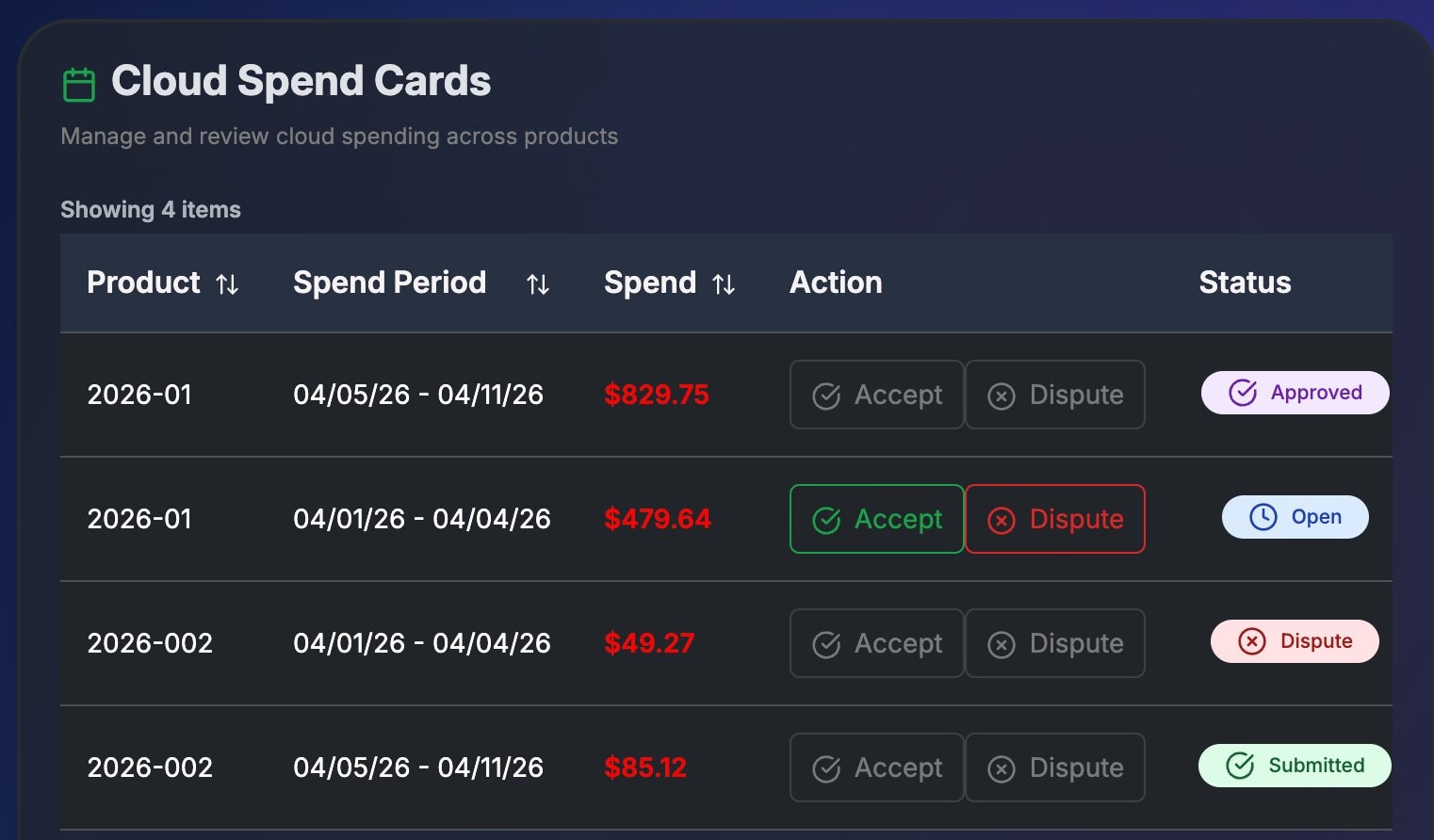
Cloud Spend Cards
Product Owner
Not: AWS Cost Explorer
Cloud Spend Cards

Weekly spend periods routed to the Product Owner for review. Accept if the numbers match expectations — dispute if something looks wrong. No AWS console access required.

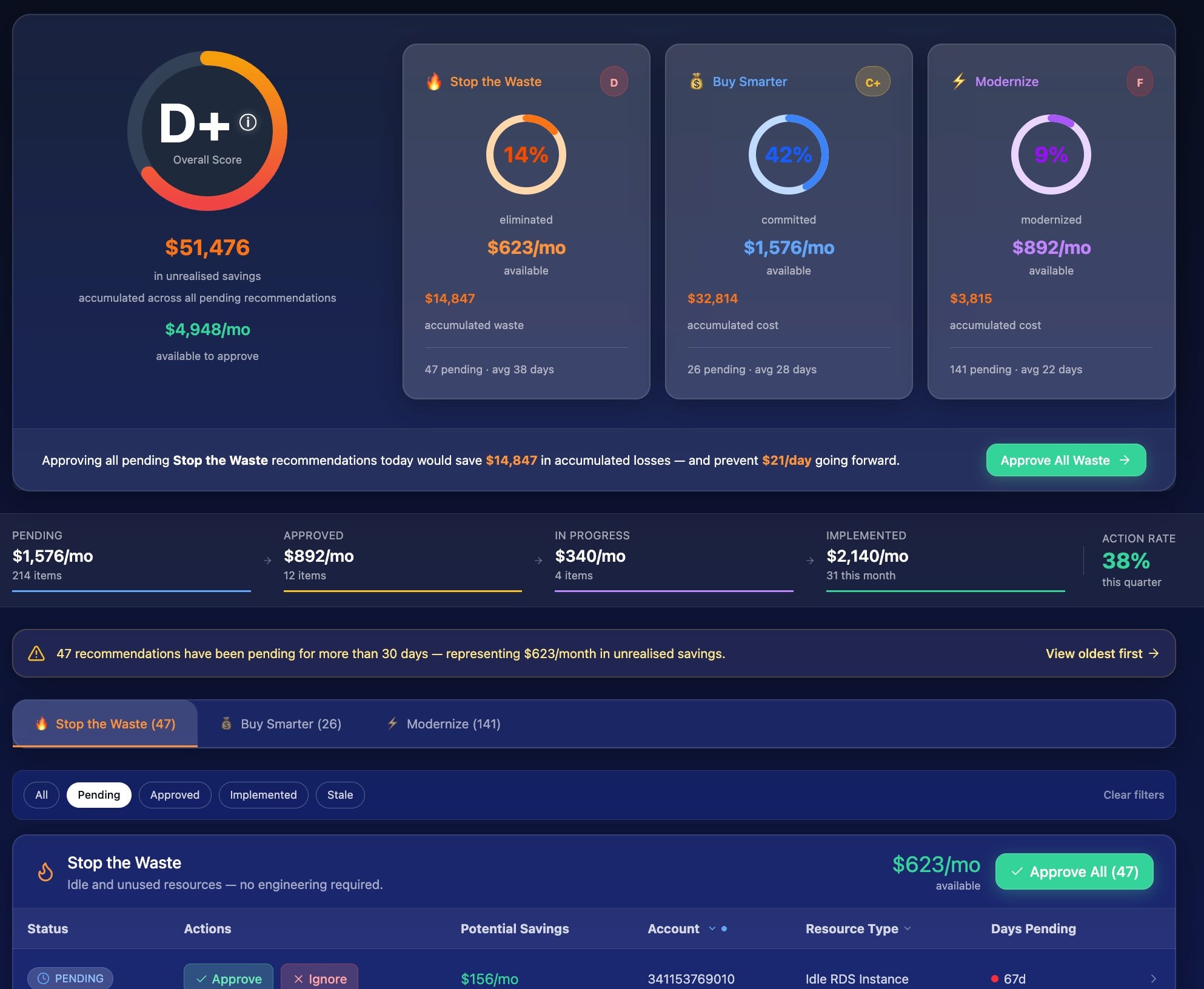
Savings Management & Report Card
FinOps Leader
Not: AWS Cost Anomaly Detection
Savings Management & Report Card

Letter-grade CFM Scoreboard with three weighted dimensions. Unrealised savings surfaced as accumulated loss with a one-click bulk-approve action. Recommendation pipeline from Pending → Approved → Implemented.

Agent Bill QuickChat
Any Role
Not: AWS Console Q&A
FinOps Center · Ask Bill
Agent Bill
Agent Bill
Product Owner Space · HR Portal scope
Online

Why is our AI spend so high this week?

Agent Bill

Your AI spend is up 4× this week. The Bedrock model for HR Portal switched from Claude Haiku to Claude Sonnet — cost per request increased from $0.012 to $0.048.

Ask about your AWS spending...
Cost Management Topic · User RLSPowered by Amazon Quick

Embedded in FinOps Center via Amazon QuickSuite. Role-scoped answers grounded in your CUR data. Ask about spend, budgets, MAP credits, or Savings Plans — in plain English.

CORE CAPABILITIES

Every dollar of AWS spend has an owner. Every owner has a workflow.

Financial Hierarchy

Your AWS spend mapped to your business structure. Business Unit → Department → Portfolio → Product. Every allocation, budget, and report uses labels your business teams already understand — not AWS technical identifiers.

Account Allocation

Assign AWS accounts to financial budgets by percentage. Shared accounts split fairly between teams. Dedicated accounts attributed 100%. Every account accounted for from day one.

Workload Resource Claiming

Product Owners claim any AWS resource with an ARN to their workload in FinOps Center. EC2 servers, RDS databases, S3 buckets, Bedrock AI models. Once claimed, cost follows ownership — automatically, every day.

Cloud Spend Cards

Weekly spending periods sent to Product Owners for business review. Accept if the numbers align with expectations. Dispute if something looks wrong. A structured period-by-period accountability process that requires no AWS knowledge.

Savings Management

AWS cost optimization recommendations presented in plain business language. FinOps Leaders approve or reject. Admins execute. A formal approval workflow with full audit trail — replacing ad hoc engineering requests with structured governance.

Budget Tracking

Annual and period budgets tracked against actuals in real time. Current Period spend, Current Month spend, available budget, and trend — surfaced at the right level for each role in your business.

MAP Contract Management

AWS Migration Acceleration Program contracts managed as a complete business process. Eligible workloads designated by Product Owners. Tagging tasks routed to Cloud Engineers. Credit utilisation tracked for FinOps Leaders. The full MAP lifecycle owned by the business, not buried in engineering.

See the full MAP solution

AI Workload Governance

FinOps Center extends business process to the next generation of workloads — Amazon Bedrock and generative AI. Product Owners designate AI workloads, set token budgets for input, output, and cache consumption, and govern AI model usage by application. AI spending is attributed to the team making the request — enabling true chargeback for AI at scale.

See the AI Cost Governance solution

Agent Bill — Conversational FinOps

Ask Agent Bill any financial question about your AWS environment in plain English. Why did this workload exceed budget? Which department is driving AI spend? How are our MAP credits tracking? Agent Bill knows your hierarchy, your budgets, your workloads, and your history — and responds with the context relevant to your role.

Meet Agent Bill

MEET YOUR AI FINANCIAL ASSISTANT

Ask Agent Bill anything about your AWS spending.

Agent Bill knows your hierarchy, your budgets, your workloads, and your history — and answers differently depending on whether you're a Product Owner, FinOps Leader, or Finance Admin.

Product Owner

“Why is our AI spend so high this week?”

Agent Bill
Agent Bill

Your AI spend is up 4× this week, driven by the AI Modernization workload in your Operations department. The Bedrock model your team selected switched from Claude Haiku to Claude Sonnet — average cost per request increased from $0.012 to $0.048. Want me to flag this to the workload owner?

FinOps Leader

“Are we going to exceed budget this month?”

Agent Bill
Agent Bill

At current run rate, you'll exceed your AI estimate by ~$180 this month. Your cache hit rate is strong — if it stays above 60%, the overage will be closer to $90. Two Savings Plan recommendations are also pending FinOps Leader approval that would offset roughly $300/mo if implemented.

ROLES AND BUSINESS PROCESS

Built for the roles that exist in your organisation — not the permissions that exist in AWS.

Every person sees the information relevant to them. Every workflow matches what that role actually does.

FinOps Leader

Owns the complete financial picture. Sets governance policy, approves savings recommendations, manages MAP contracts, allocates credits, and tracks org-wide spending against targets.

Product Owner

Owns their workload's AWS resources and spending. Claims resources, creates estimates, reviews and accepts Cloud Spend Cards, and designates workloads as MAP or AI workloads.

Financial Admin

Configures the financial hierarchy, allocates accounts to budgets, manages user access, and sets up the business process framework for the organisation.

Cloud Engineer

Works through structured task queues — MAP tagging, Bedrock inference profile setup, tag drift remediation — routed by the platform, not by ad hoc engineering requests.

Department Manager

Sees their department's total spending across all portfolios and products. Tracks budget vs actual. Understands trends without needing AWS access.

DEPLOYED ON AWS — INSIDE YOUR CUSTOMER CLOUD ESTATE

Your spending data never leaves your account.

FinOps Center is a Deployed on AWS solution. It installs directly into your AWS environment via AWS Marketplace and runs entirely within your Customer Cloud Estate. There is no shared multi-tenant infrastructure. No data is transmitted to third-party systems. No external SaaS dependency sits between your business teams and your AWS spending.

Deployed inside your Customer Cloud Estate

Installed via AWS Marketplace and CloudFormation directly into your environment. No shared multi-tenant infrastructure. No data hops to a vendor cloud. Your allocations, approvals, budgets, and workload configurations are stored in your own DynamoDB tables.

Your own Cognito + AppSync

Identity governed by your existing Amazon Cognito user pools. Authorization through your own AWS AppSync layer. Agent Bill's conversational AI runs through your own AgentCore runtime. The same security controls you already trust — no new auth model to audit.

No third-party data transmission

Every allocation, approval, budget, and report lives in your account. This is cloud financial management that respects the same data governance standards your business applies to everything else in your AWS environment.

FinOps In-a-Box (hourly)

Pay-as-you-go flexibility

$0.99/hr
Try for Free
Full Features
10 Accounts

FinOps In-a-Box

A cost-effective annual plan

$5k/yr
Buy Now
Full Features
25 Accounts

Enterprise

Comprehensive enterprise solution

$30k/yr
Buy Now
Full Features
Unlimited Accounts