
FinOps Center
Cost Saving Report Card

Your cloud costs have a report card. Do you know your grade?

FinOps Center evaluates your AWS environment across three dimensions — waste elimination, commitment strategy, and resource modernization — and gives you a single, honest score. Not a dashboard full of numbers. A grade.

Engineering teams don't act on lists. They act on deadlines.

WHY DID WE BUILD?

Most FinOps tools give you a list of recommendations and a dashboard. Then they leave you to figure out what matters, who owns what, and how fast it should be done.

The Cost Saving Report Card gives FinOps leaders a single view of cloud cost management performance — not just what AWS is recommending, but whether your organisation is responding at the right pace. Grades update daily as your environment changes and as your team acts.

An improving grade is visible proof of progress. A declining grade is an early warning before the next bill lands.

THE REPORT CARD

One grade. Three dimensions. The accumulated loss number nobody else surfaces.

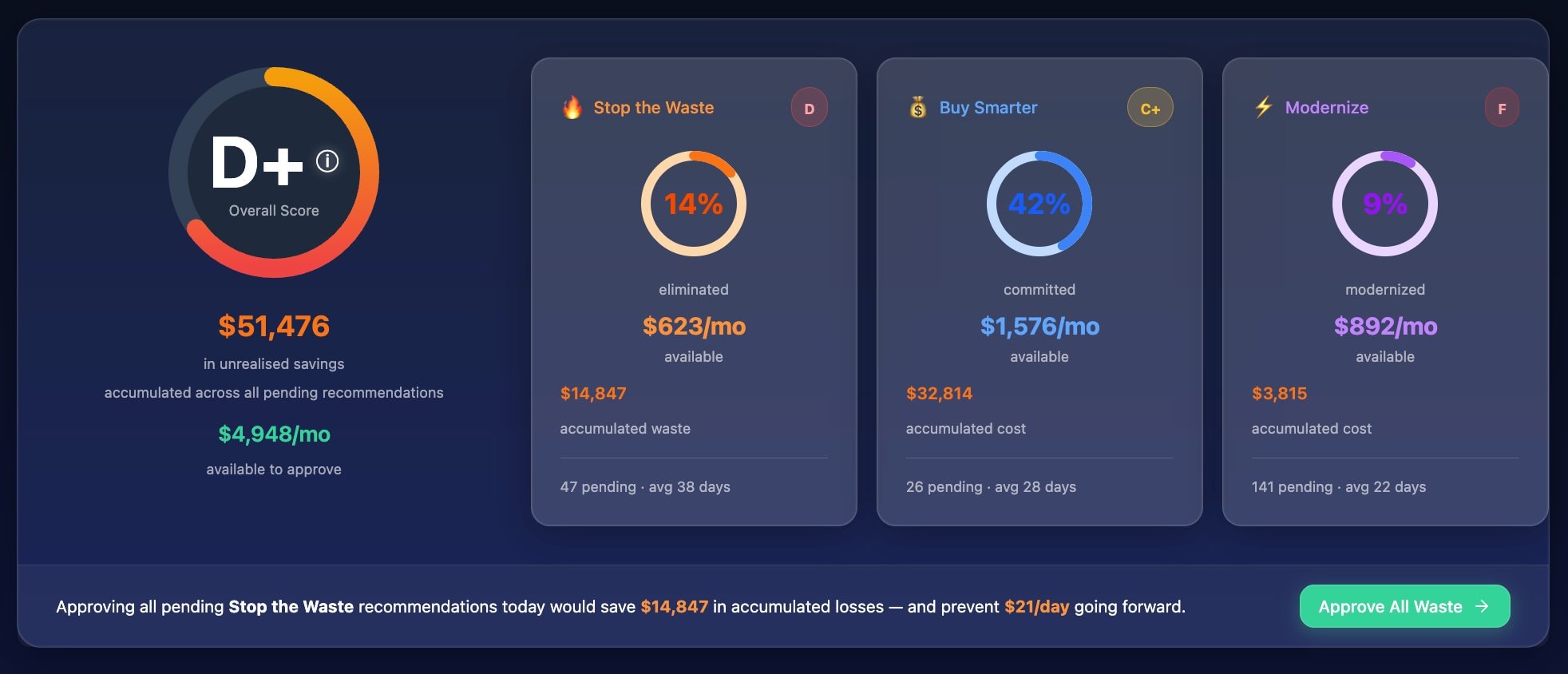
FinOps Center Cost Saving Report Card — D+ overall score with Stop the Waste (D, 14% eliminated), Buy Smarter (C+, 42% committed), Modernize (F, 9% modernized), and Approve All Waste action banner
Overall Grade

Letter grade D+ with overall score. Weighted average of the three dimensions. Updates daily as recommendations are approved and implemented.

Stop the Waste · D

14% eliminated. $623/mo available. $14,847 accumulated waste. 47 pending recommendations averaging 38 days.

Buy Smarter · C+

42% committed. $1,576/mo available. 26 pending Savings Plan and commitment recommendations.

One-click action

“Approve All Waste” button for bulk approval of pending Stop the Waste recommendations — with accumulated loss and daily prevention clearly stated.

HOW SCORES ARE CALCULATED

Transparent scoring. Defensible to leadership.

Every grade has a formula. Every formula is visible. FinOps Center scores you on what's overdue relative to the effort required — not just what's pending.

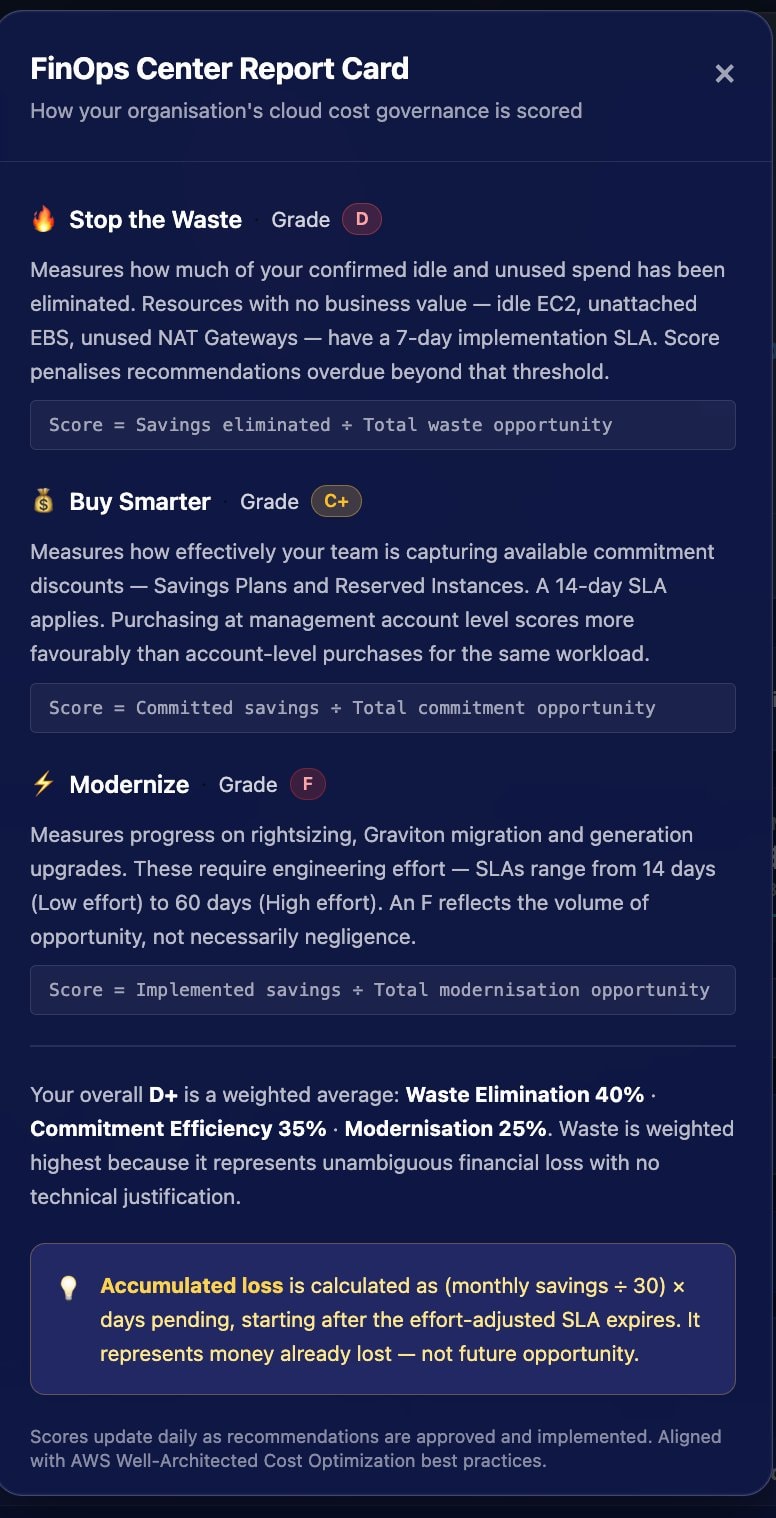
FinOps Center Report Card scoring methodology — Stop the Waste Grade D, Buy Smarter Grade C+, Modernize Grade F, with formulas and weighted average explanation
🔥Stop the WasteGrade D
40% of overall

Measures how much of your confirmed idle and unused spend has been eliminated. Resources with no business value — idle EC2, unattached EBS, unused NAT Gateways — have a 7-day implementation SLA. Score penalises recommendations overdue beyond that threshold.

Score = Savings eliminated ÷ Total waste opportunity7-day implementation SLA
💰Buy SmarterGrade C+
35% of overall

Measures how effectively your team is capturing available commitment discounts — Savings Plans and Reserved Instances. Purchasing at management account level scores more favourably than account-level purchases for the same workload.

Score = Committed savings ÷ Total commitment opportunity14-day SLA
ModernizeGrade F
25% of overall

Measures progress on rightsizing, Graviton migration, and generation upgrades. These require engineering effort — SLAs range from 14 days (Low effort) to 60 days (High effort). An F reflects the volume of opportunity, not necessarily negligence.

Score = Implemented savings ÷ Total modernisation opportunity14–60 day SLA by effort
Weighted overall score

Overall = (Waste × 0.40) + (Commit × 0.35) + (Modernize × 0.25)

Waste is weighted highest because it represents unambiguous financial loss with no technical justification.

💡 Accumulated Loss formula

Accumulated loss is calculated as (monthly savings ÷ 30) × days pending, starting after the effort-adjusted SLA expires. It represents money already lost — not future opportunity.

Scores update daily as recommendations are approved and implemented. Aligned with AWS Well-Architected Cost Optimization best practices.

THREE DIMENSIONS · ONE GRADE

Stop guessing. Start grading.

Most FinOps tools show you a list of recommendations and leave you to figure out what matters. FinOps Center scores your organisation's response to those recommendations — and holds you accountable to a timeline.

40% of your score

Stop the Waste

Idle instances, unattached volumes, unused NAT Gateways, forgotten snapshots. These are the easiest wins in cloud cost management — and the most damning when left unaddressed. Stop the Waste measures how quickly your team acts on resources that are costing money and delivering nothing.

35% of your score

Buy Smarter

Reserved Instances and Savings Plans exist because AWS rewards commitment. Buy Smarter measures whether your organisation is taking advantage of the commitment opportunities AWS has identified for your actual usage patterns — at the right account level, in the right sequence.

25% of your score

Modernize

Rightsizing, Graviton migration, generation upgrades. Modernize measures your team's progress on the engineering investments that compound over time — harder to action, but permanently cheaper when done.

THE PART MOST TOOLS MISS

Effort-adjusted grading.

A High-effort rightsizing project pending for 20 days is not the same problem as a VeryLow-effort idle instance pending for 20 days. FinOps Center grades you on what's overdue relative to the effort required — not just what's pending.

EFFORT-BASED SLA WINDOWS
Effort LevelSLA WindowExample
VeryLow7 daysDelete an unattached EBS volume
Low14 daysStop an idle EC2 instance
Medium30 daysRightsize a workload to a smaller instance
High60 daysMigrate a fleet to Graviton
AGING STATES

Within SLA

0 days overdue

Pending but inside the effort-adjusted window. No grade penalty yet.

Recently overdue

1–14 days overdue

Past the SLA. Accumulated loss begins accruing.

Significantly overdue

15+ days overdue

Materially impacting your grade. Prioritise immediately.

The result: a grade that's fair, defensible to leadership, and genuinely motivating to the engineers who have to act on it.

ACCUMULATED LOSS

The number that creates urgency.

Every day a pending recommendation sits unactioned past its expected window, FinOps Center calculates the savings you didn't capture. We call it accumulated loss — not unrealised savings, not potential value. Loss. Because that's what it is.

Loss accruing

VeryLow effort · $90/mo · pending 21 days

Daily Savings$90 / 30 = $3.00/day
Overdue Days21 − 7 = 14 days
Accumulated Loss$42

Still within SLA

High effort · $900/mo · pending 21 days

Daily Savings$900 / 30 = $30.00/day
Overdue Daysmax(0, 21 − 60) = 0 days
Accumulated Loss$0

A complex engineering project pending three weeks isn't penalised the same way as a trivial delete action pending three weeks. That's what makes the grading fair — and what makes the accumulated loss number trustworthy enough to put in front of an executive.

ASK YOUR REPORT CARD

Every grade has a question behind it.

Agent Bill answers them — at every level of the hierarchy.

FinOps Leader

Why did our overall grade drop this week?

Agent Bill
Agent Bill

Your Stop the Waste score fell from 62 to 45. Three high-savings idle EC2 recommendations crossed their SLA on Tuesday. Accumulated loss on those three alone is $1,840 month-to-date. The Platform team owns all three.

WHERE IT RUNS

All of this happens inside your AWS account.

Your cost data never leaves. Your governance structure — the approval chains, the budget hierarchy, the role-based access — is what enforces the grade. Not a third-party platform making decisions on your behalf.